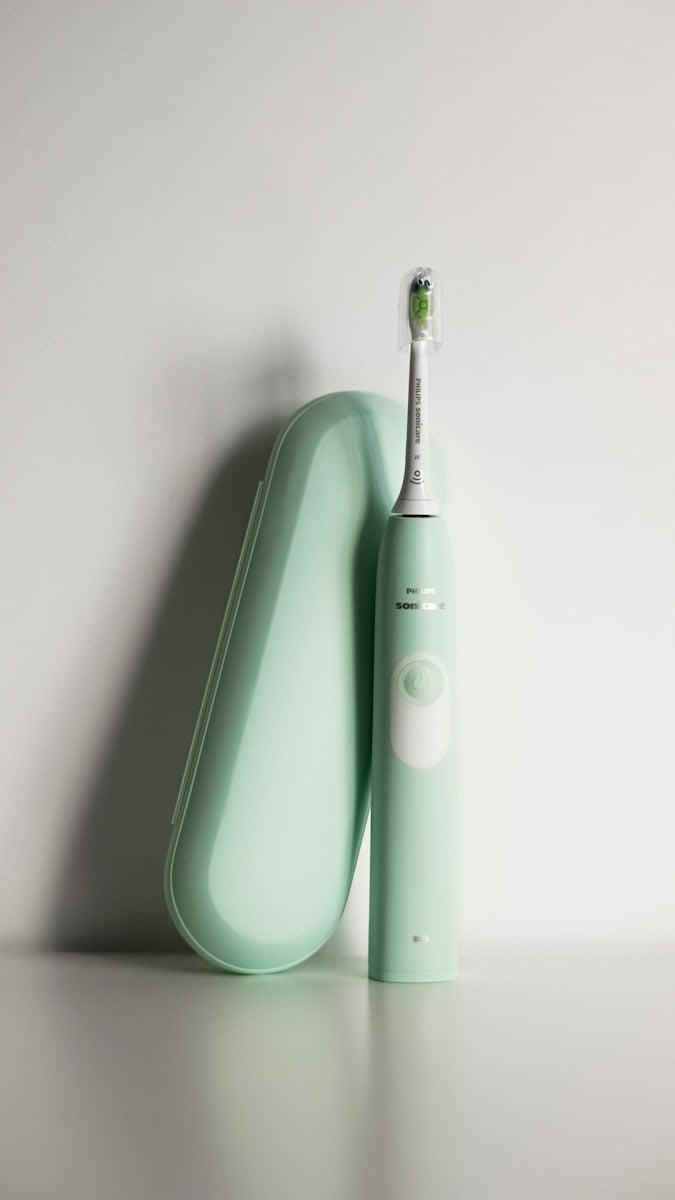
Changing the speed on your Sonicare toothbrush can enhance your brushing experience. To adjust the intensity, simply press the power button while brushing to cycle through the available settings. Most Sonicare models offer low, medium, and high intensity options.
The right speed depends on your comfort level and oral health needs. Lower speeds suit those with sensitive teeth or gums. Higher speeds provide a more vigorous clean for removing tough plaque. Experiment to find what works best for you.
Customizing your brush settings helps maintain good oral hygiene. By tailoring the intensity to your preferences, you’re more likely to brush regularly and thoroughly. This improves your overall dental health and keeps your smile bright.
| Intensity Level | Best For |
|---|---|
| Low | Sensitive teeth and gums |
| Medium | Everyday cleaning |
| High | Deep cleaning, plaque removal |
How to Change Speed on Sonicare Toothbrush (Complete Guide)
Philips Sonicare toothbrushes are designed to give you a powerful and customizable clean. Many models include multiple intensity settings (often referred to as speed) so you can adjust brushing based on comfort and dental needs.
If you’re wondering how to change the speed on your Sonicare toothbrush, this step-by-step guide will walk you through it.
Does Your Sonicare Model Have Adjustable Speed?
Not all Sonicare toothbrushes have multiple speeds. Basic models like the Philips Sonicare 1100 or 2100 series may only have one standard brushing mode.
Models that typically include adjustable intensity levels:
- Sonicare ProtectiveClean series
- Sonicare ExpertClean
- Sonicare DiamondClean
- Sonicare FlexCare
- Sonicare Prestige
If your toothbrush has more than one setting, you’ll usually see multiple LED indicators or a button labeled for intensity/mode.
How to Change Speed (Intensity) on Sonicare Toothbrush
Most Sonicare toothbrushes use one of two methods:
Method 1: Change Intensity Before Brushing (Most Common)
Steps:
- Turn on your toothbrush.
- Look for an Intensity button (often below the power button).
- Press the intensity button to cycle through levels:
- Low
- Medium
- High
- The LED light indicator will show the selected level.
- Start brushing.
✅ Some models require you to select the speed before placing it in your mouth.
Method 2: Change Speed While Brushing
Some newer models allow you to adjust intensity while brushing.
Steps:
- Turn on the toothbrush.
- Press the intensity button once to move to the next level.
- Continue pressing until you reach your preferred speed.
If nothing changes, your model may not support multiple speeds.
How to Change Brushing Modes (If Available)
Some Sonicare toothbrushes offer multiple brushing modes in addition to speed levels.
Common modes include:
- Clean – Standard daily brushing
- White – Removes surface stains
- Gum Care – Gentle on gums
- Deep Clean – Extra thorough brushing
- Sensitive – For sensitive teeth
To Change Modes:
- Turn off the toothbrush.
- Press the Mode button to cycle through options.
- Select your desired mode.
- Adjust intensity if needed.
- Start brushing.
Understanding Sonicare Speed vs. Mode
It’s important to know the difference:
| Feature | What It Does |
|---|---|
| Mode | Changes brushing pattern and timing |
| Intensity (Speed) | Adjusts vibration strength |
You can usually combine a mode with your preferred intensity level.
Why Change the Speed?
Adjusting speed can improve comfort and results.
Use Low Intensity If:
- You have sensitive teeth
- Your gums bleed easily
- You’re new to electric toothbrushes
Use High Intensity If:
- You want deeper cleaning
- You have plaque buildup
- You prefer stronger vibrations
If unsure, consult your dentist.
What If Your Sonicare Won’t Change Speed?
If the intensity button isn’t working, try these steps:
1. Check Your Model
Some entry-level Sonicare toothbrushes only have one speed.
2. Fully Charge the Toothbrush
Low battery may limit functionality.
3. Reset the Toothbrush
- Place it on the charger.
- Hold the power button for 10–15 seconds.
- Release and try again.
4. Check the User Manual
Different series may have slightly different button combinations.
How to Enable EasyStart (Optional Feature)
Some Sonicare models include EasyStart, which gradually increases intensity over the first 14 uses.
To Enable/Disable EasyStart:
- Place the handle on the charger.
- Press and hold the power button for 2–5 seconds.
- Listen for a beep or watch for LED confirmation.
This feature is helpful if you’re transitioning from a manual toothbrush.
Tips for Best Results
- Replace brush heads every 3 months
- Avoid pressing too hard (let Sonicare do the work)
- Brush for the full 2 minutes
- Use the built-in quadpacer to clean each quadrant evenly
Frequently Asked Questions
Why can’t I find the speed button?
Some Sonicare models combine the mode and intensity into one button. Others only have one fixed speed.
Does higher speed clean better?
Higher intensity may remove more plaque, but it’s not necessary for everyone. Comfort and consistency matter most.
Can I damage my gums using high speed?
If used correctly and without pressing too hard, Sonicare is safe. If you experience discomfort, lower the intensity.
Final Thoughts
Changing the speed on your Sonicare toothbrush is simple once you know where the intensity controls are. Most models allow you to choose between low, medium, and high settings, giving you a more personalized brushing experience.
If your toothbrush doesn’t change speed, it may be a single-intensity model. In that case, upgrading to a multi-mode Sonicare can offer more flexibility.
Understanding Your Sonicare Toothbrush
Sonicare toothbrushes offer various features to enhance your brushing experience. Knowing your model and locating key buttons will help you use your brush effectively.
Identifying Your Sonicare Model
Sonicare offers several models with different features. Popular options include the DiamondClean series (HX9352/30, HX9372/04) and the ProtectiveClean line (HX9332/04). Check the model number on your brush handle or packaging.
DiamondClean models typically have multiple brushing modes and intensity settings. The ProtectiveClean series focuses on gentle yet effective cleaning. Some models come with smart features that connect to apps for personalized brushing guidance.
Locating the On/Off Button and Brushing Modes
The on/off button is usually on the front of the brush handle. Press it once to turn on the brush. Many Sonicare models have multiple brushing modes accessible through this button.
To change modes, press the power button quickly while the brush is on. Common modes include:
- Clean: Standard daily cleaning
- White+: Removes surface stains
- Gum Health: Gentle gum massage
- Deep Clean+: Thorough cleaning session
Some models have separate buttons for mode selection and intensity control. The brush may light up or beep to indicate mode changes.
| Model | Modes | Intensity Levels |
|---|---|---|
| HX9352/30 | 5 | 3 |
| HX9372/04 | 5 | 3 |
| HX9332/04 | 3 | 3 |
Experiment with different modes to find what works best for your oral care needs.
Changing Speeds and Brushing Intensity
Adjusting your Sonicare toothbrush’s speed and intensity can improve your brushing experience. The right settings help you clean effectively while protecting sensitive teeth and gums.
Selecting the Right Intensity Level
Sonicare toothbrushes typically offer three intensity levels: low, medium, and high. Low intensity suits sensitive teeth and gums or new users. Medium provides a balance of power and comfort for daily use. High intensity delivers maximum cleaning power for stubborn plaque removal.
To change intensity, press the power button while the brush is on. Some models require you to press a separate intensity button. The LED display will indicate the current level.
Start with low intensity if you’re new to electric toothbrushes. Gradually increase as you get comfortable. Listen to your teeth and gums – if you feel discomfort, lower the intensity.
Switching Between Modes
Sonicare toothbrushes offer various brushing modes for different needs:
| Mode | Purpose |
|---|---|
| Clean | Standard daily cleaning |
| White | Stain removal and polishing |
| Gum Health | Gentle gum massage and cleaning |
| Deep Clean | Intense cleaning for problem areas |
To switch modes, press the mode button within 5 seconds of turning on your toothbrush. Keep pressing until you reach your desired mode. The LED display will show the active mode.
Clean mode works well for most users. Try White mode for surface stains or Deep Clean for thorough cleaning. Gum Health mode helps improve gum health with gentle stimulation.
Remember to replace your brush head every 3 months for optimal performance. Some models have a brush head replacement reminder to help you keep track.
Caring For Your Gums and Teeth
Proper oral care involves more than just brushing. It requires attention to your gums and choosing the right tools and techniques for your specific needs.
Optimizing Brush Head Performance
To get the best results from your Sonicare toothbrush, replace the brush head every 3 months. This ensures the bristles remain effective at removing plaque and debris.
Always use gentle pressure when brushing. Let the sonic technology do the work. Pressing too hard can damage your gums and enamel.
For maximum cleaning power, angle the brush head at 45 degrees to your gum line. This position helps remove plaque from both teeth and gums.
Experiment with different brush heads. Sonicare offers various options designed for specific needs like plaque control or whitening.
Clean your brush head after each use. Rinse it thoroughly and store it upright to air dry. This prevents bacteria buildup.
Tips for Sensitive Teeth and Gums
If you have sensitive teeth or gums, start with the lowest intensity setting on your Sonicare. Gradually increase as your mouth adapts.
Use a sensitive brush head with extra-soft bristles. These are gentler on tender gums and worn enamel.
Try the Sensitive mode if your Sonicare model has it. This mode provides a softer cleaning action for sensitive areas.
Avoid brushing immediately after acidic foods or drinks. Wait at least 30 minutes to prevent enamel erosion.
Consider using a desensitizing toothpaste. These products can help reduce tooth sensitivity over time.
If sensitivity persists, consult your dentist. They can identify underlying issues and recommend targeted treatments.
| Sensitivity Level | Recommended Sonicare Settings |
|---|---|
| Mild | Low intensity, Regular mode |
| Moderate | Low intensity, Sensitive mode |
| Severe | Extra-low intensity, Gum Care |
Maintenance and Troubleshooting
Proper care of your Sonicare toothbrush ensures optimal performance and longevity. Regular charging and cleaning are key to maintaining your device.
Charging Your Sonicare Toothbrush
Place your Sonicare on the charger base when not in use. Most models take about 24 hours to fully charge. The battery indicator light blinks green during charging and turns solid when complete.
For travel, pack the charger or use a model with extended battery life. Some Sonicare toothbrushes can last up to 3 weeks on a single charge.
If the battery dies completely, it may take up to 24 hours of continuous charging to revive. Refer to your user manual for model-specific charging instructions.
Cleaning and Storing the Toothbrush
Rinse your brush head and handle with warm water after each use. Remove the brush head weekly and clean the metal shaft with a damp cloth.
Wipe the handle dry before placing it on the charger. Store your Sonicare in a cool, dry place away from direct sunlight.
Replace brush heads every 3 months or sooner if bristles are frayed. Many models have a brush head replacement reminder light.
For travel, use the protective cap provided with most Sonicare models to keep the brush head clean.
| Maintenance Task | Frequency |
|---|---|
| Rinse brush head and handle | After each use |
| Clean metal shaft | Weekly |
| Replace brush head | Every 3 months |
| Charge toothbrush | When battery is low |
Frequently Asked Questions
Adjusting settings on Philips Sonicare toothbrushes varies by model. Different series offer unique features and adjustment methods. Let’s explore the most common questions about changing speeds and settings.
What are the steps to adjust the intensity settings on the Philips Sonicare 4100 series?
The Philips Sonicare 4100 series allows you to change intensity settings easily. Press the power button while the brush is on to cycle through intensity levels. The LED indicator on the handle shows the current setting.
Low intensity is ideal for sensitive teeth. Medium provides a balance of power and comfort. High intensity delivers maximum plaque removal.
How do I reset my Philips Sonicare electric toothbrush to its default settings?
To reset your Sonicare toothbrush:
- Unplug the charger.
- Press and hold the power button for 10 seconds.
- You’ll hear a beep when the reset is complete.
This process restores factory settings. It’s useful if you’ve changed settings accidentally or want to start fresh.
What are the various speed options available on Philips Sonicare toothbrushes?
Philips Sonicare toothbrushes typically offer three main speed options:
- Low
- Medium
- High
Some advanced models may have additional specialized modes like Gum Care or Whitening. These modes adjust speed and vibration patterns for specific oral care needs.
How can the speed of a Philips Sonicare toothbrush be increased or decreased?
To change the speed on most Sonicare models:
- Turn on the toothbrush.
- Press the power button again to cycle through speeds.
- Stop when you reach your desired setting.
The LED indicator or display screen will show the current speed. Some models may require you to press a separate intensity button.
Where can I find the intensity adjustment feature on my Sonicare 6100?
On the Sonicare 6100:
- Locate the intensity button below the power button.
- Press this button to toggle between intensity levels.
- LED lights on the handle indicate the current setting.
You can adjust intensity before or during brushing. The brush remembers your last used setting for convenience.
How does one change the brushing modes on the Philips Sonicare 9000?
The Sonicare 9000 offers multiple brushing modes. To change modes:
- Turn on the toothbrush.
- Press the mode button to cycle through options.
- The LED display shows the active mode.
You can also use the Sonicare app to customize and select modes. This gives you more control over your brushing experience.
| Model | Speed/Intensity Adjustment | Number of Settings |
|---|---|---|
| 4100 | Power button | 3 |
| 6100 | Separate intensity button | 3 |
| 9000 | Mode button + App | 5+ |