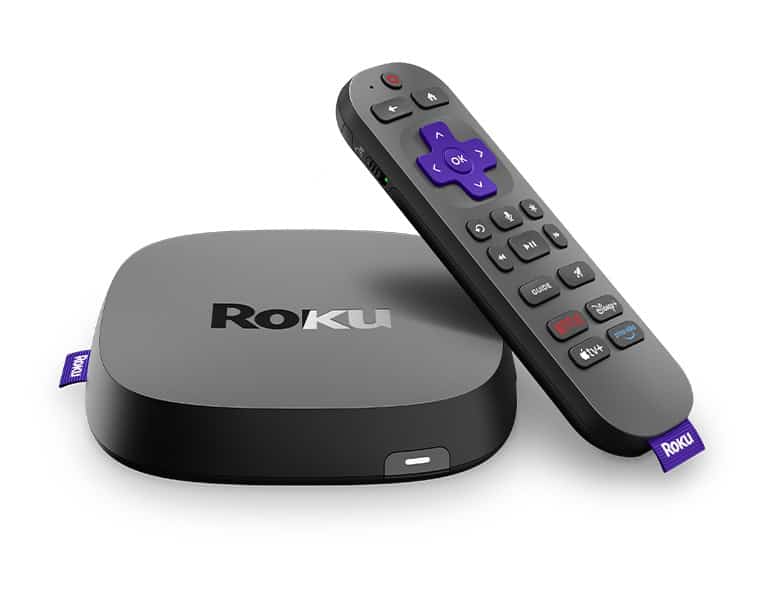
Roku devices have become popular for streaming entertainment. Many wonder how long these gadgets will last. The lifespan of a Roku can vary based on several factors.
Most Roku devices typically last between 3 to 5 years with regular use. This timeframe can change depending on the model and how it’s used. Streaming sticks may have shorter lifespans compared to Roku boxes due to potential overheating issues.
The longevity of your Roku also depends on its usage and environment. Devices used for long periods daily may wear out faster. Proper care and maintenance can help extend a Roku’s life. Some users report their devices lasting up to 7 years with good care.
How Long Does a Roku Last? Lifespan and Durability Assessment
Roku devices are known for being affordable and easy to use — but how long can you expect one to last?
✅ Average Roku Lifespan
Most Roku devices last 3 to 7 years, depending on usage, model, and care.
Multiple industry sources estimate:
- 3–5 years under average use (source: SmartTechSavvy, TME.net)
- Up to 7 years with proper maintenance and moderate usage (source: ComputerCity)
For most households, 4–6 years is a realistic expectation before performance noticeably declines or software support ends.
What Affects Roku’s Lifespan?
Several factors determine how long your Roku will last.
1️⃣ Usage Frequency
- Daily heavy streaming (4–8+ hours/day) may shorten lifespan.
- Occasional use extends longevity.
Like most electronics, continuous heat and power cycling gradually wear internal components.
2️⃣ Model Type
Not all Roku devices are equal.
- Roku Express (budget models) – Tend to have shorter lifespans due to lower-end hardware.
- Roku Streaming Stick / Ultra – Typically last longer thanks to better processors and cooling.
- Roku TVs – Lifespan depends on both the Roku software and the TV panel itself.
Roku TVs generally last as long as typical LED TVs — around 5–7 years, depending on brand quality (source: BoostVision).
3️⃣ Software Support
Sometimes a Roku stops receiving:
- Major OS updates
- New channel support
- Security patches
Even if the hardware still works, outdated software can make the device feel “obsolete” after 4–6 years.
4️⃣ Heat & Ventilation
Overheating is one of the biggest lifespan reducers.
Common causes:
- Placing Roku in enclosed cabinets
- Blocking ventilation vents
- Stacking devices
Proper airflow can significantly extend device life (source: TheaterDIY).
5️⃣ Power Surges
Power fluctuations can damage internal components.
Using a surge protector can prevent premature failure.
Signs Your Roku Is Wearing Out
Here are common signs your Roku may be nearing the end of its lifespan:
- Slower menu navigation
- Frequent app crashes
- Buffering despite strong internet
- Random restarts
- Overheating warnings
- Loss of support for streaming apps
If your Roku is over 5 years old and showing these symptoms, replacement may be more cost-effective than troubleshooting.
Roku Device vs. Roku TV: Lifespan Comparison
| Device Type | Average Lifespan |
|---|---|
| Roku Express | 3–5 years |
| Roku Streaming Stick | 4–6 years |
| Roku Ultra | 5–7 years |
| Roku TV | 5–7 years (panel-dependent) |
How to Make Your Roku Last Longer
Want to get the full 7 years (or more) out of your device? Follow these tips:
✅ 1. Keep It Cool
- Ensure proper airflow
- Don’t block vents
- Avoid placing near heat sources
✅ 2. Restart Periodically
A monthly restart clears memory and prevents software slowdowns.
✅ 3. Update Software
Keep automatic updates enabled for performance and security fixes.
✅ 4. Use a Surge Protector
Prevents electrical damage.
✅ 5. Avoid Cheap Power Adapters
Use the original Roku adapter when possible.
When Should You Replace a Roku?
Consider upgrading if:
- Your device no longer receives updates
- Streaming apps stop working
- It doesn’t support 4K but your TV does
- It feels consistently slow
Given the relatively low cost of newer Roku models, upgrading every 4–6 years is common and reasonable.
Final Verdict
A Roku device typically lasts 3 to 7 years, depending on:
- Usage habits
- Model quality
- Ventilation
- Software support
- Power protection
With proper care, many users get 5+ years of reliable performance.
If your Roku is over 5 years old and starting to lag, it may simply be reaching the natural end of its lifecycle — not necessarily “broken,” just aging.
Key Takeaways
- Roku devices generally last 3-5 years with normal use
- Proper care and maintenance can extend a Roku’s lifespan
- Usage patterns and device model affect how long a Roku lasts
Understanding Roku Lifespan
Roku devices have varying lifespans based on several key factors. The average Roku can last between 3 to 7 years with proper care and use.
Factors Affecting Lifespan
Usage plays a big role in how long a Roku lasts. Devices used for many hours each day may wear out faster. The environment also matters. Keeping your Roku in a cool spot helps it last longer.
Dust can cause problems. Clean your Roku gently to avoid overheating. Regular updates are important too. They keep your device running smoothly.
Electrical issues can shorten a Roku’s life. Use a surge protector to guard against power spikes. Proper storage when not in use helps too. Keep your Roku in a dry place away from extreme temps.
Lifespan Comparisons with Other Streaming Devices
Roku devices often last as long as or longer than other streaming gadgets. Here’s a quick comparison:
- Roku: 3-7 years
- Apple TV: 3-5 years
- Amazon Fire TV: 3-5 years
- Chromecast: 2-4 years
Build quality affects how long devices last. Roku is known for sturdy products. This helps them hold up well over time.
Software support is key too. Roku often provides updates for older models. This keeps them useful for longer.
Extending Your Roku’s Life
You can help your Roku last longer with some simple steps:
- Keep it cool: Place it in a well-ventilated area
- Clean regularly: Dust with a soft cloth
- Update often: Install new firmware when available
- Use carefully: Handle the device and remote with care
If issues arise try a factory reset. This can fix many problems. For tough issues contact Roku support. They can offer more help.
Check your warranty too. It might cover repairs or replacement. Most Roku warranties last 1-2 years.
Good care can push your Roku beyond its expected life. With the right steps you might enjoy your device for many years.
Usage and Technical Considerations
Proper usage and technical know-how can extend your Roku’s life. Regular updates and smart settings help your device run smoothly. Fixing common issues and having a good internet connection are also key.
Optimizing Roku Settings and Updates
To keep your Roku running well, update it often. Go to Settings > System > System Update to check for new software. Set your Roku to update automatically for the best performance.
Adjust display settings to fit your TV. Pick the right screen resolution and HDR mode if your TV supports it. This can prevent strain on your Roku.
Use power-saving features. Set the Roku to sleep when not in use. This cuts down on wear and tear.
Keep your Roku cool. Don’t put it in tight spaces. Good airflow helps it last longer.
Troubleshooting Common Issues
If your Roku freezes, try a quick reboot. Unplug it for 10 seconds, then plug it back in.
Remote not working? Change the batteries. If that fails, re-pair it with the Roku.
For app problems, delete and reinstall them. This often fixes glitches.
If your Roku is very slow, try a factory reset. Go to Settings > System > Advanced system settings > Factory reset.
Connectivity for Seamless Streaming
A stable internet connection is vital for your Roku. Use an Ethernet cable for the best speed if possible.
If using Wi-Fi, place your Roku close to your router. Walls and other devices can block the signal.
Test your internet speed. Roku needs at least 3 Mbps for SD and 5 Mbps for HD streaming.
If videos keep buffering, try rebooting your modem and router. This can often fix connection issues.
Consider upgrading your internet plan if you stream a lot. More bandwidth means smoother playback.
Frequently Asked Questions
Roku devices can last several years but may eventually show signs of wear. Users often wonder about typical lifespans and how to spot problems.
How can you tell when your Roku device is malfunctioning?
Look for slow performance or frequent freezing. You might see video buffering or apps that won’t load. The remote may stop working or become unresponsive. If these issues persist after a restart, your Roku might be failing.
What is the lifespan of a Roku Streaming Stick?
Roku Streaming Sticks typically last 2-5 years. Heavy use can shorten this time. Keeping the stick cool and updating it regularly may help it last longer.
What is the average duration of service for a Roku Ultra?
The Roku Ultra often lasts longer than streaming sticks. It can work well for 5-7 years or more. Its larger size helps with cooling, which extends its life.
Are newer Roku models more efficient than older ones?
Yes, newer Roku models are usually more efficient. They have better processors and use less power. This can lead to smoother performance and a longer lifespan.
How frequently are Roku devices expected to be updated?
Roku updates its devices every 1-2 years. But you don’t need to replace yours that often. Software updates keep older models working well for years.
What could cause a Roku device to suddenly stop working?
Power surges can damage Roku devices. Overheating is another common cause of failure. Software glitches may also make a Roku seem broken. Always try a restart before assuming it’s dead.